Harbor Breeze Mazon Ceiling Fan
The Harbor Breeze Mazon ceiling fan is a 44-inch, three-blade flush mount fan with an integrated 18-watt LED light and a handheld remote, made for small rooms with standard or low ceilings. It is one of the most reviewed Harbor Breeze fans at Lowe’s. Below are its specs and four finishes, the remote programming steps, what to do when the LED light fails, and its manual and parts.
Harbor Breeze Mazon 44-inch ceiling fan specs
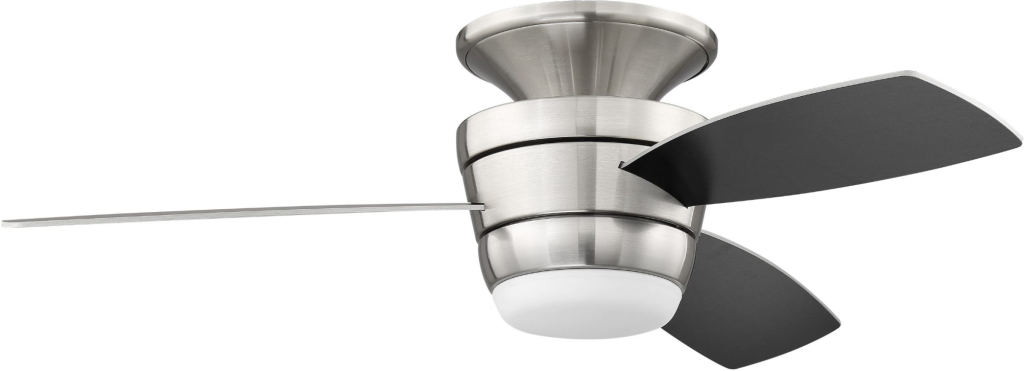
| Size | 44 in, 3 reversible blades |
| Mounting | Flush mount only, on a flat ceiling |
| Hanging height | 11.75 in from ceiling to the bottom |
| Airflow | 2,747 CFM on high, 178 RPM |
| Power on high | 58 W |
| Light | Integrated LED, 18 W, 935 lumens, 3000K, dims to 10% |
| Control | Handheld remote, 3 speeds |
| Weight | 14.57 lb with the light kit |
| Location | Indoor only |
| Warranty | Motor for the life of the product; other parts 1 year; glass not covered |
From the Mazon listing at Lowe’s and the Mazon manual. The listing’s room size is small rooms; Lowe’s text gives both 100 and 225 square feet.
Harbor Breeze Mazon finishes and model numbers
All finishes share one manual and the same motor, light and remote. The blades are reversible, black on one side.
Harbor Breeze Mazon ceiling fan remote programming
The Mazon remote pairs to the fan in a 30-second window after power comes on. These are the manual’s steps.
Remote buttons
- 3, 2, 1: high, medium, low
- 0: fan off
- Light: tap for on or off
- Light: hold to dim
Good to know
- The light resumes its last setting
- Reverse is a switch on the fan, not on the remote
- No timer is mentioned in the manual
Still not answering? See remote not working.
Harbor Breeze Mazon ceiling fan LED light replacement
The Mazon has no bulb to change. Its manual says not to try to replace the LEDs or repair the LED part, and to call customer service instead.
Among the Mazon’s Lowe’s reviews, the repeated complaint is the integrated LED module failing, with no way to swap it like a bulb.Lowe’s customer reviews of the Mazon 44-in matte black, lowes.com
Harbor Breeze Mazon installation and wiring
Mounting
- Flush mount only, on a flat ceiling
- Metal octagonal outlet box rated for fan support
- Blades at least 7 ft up and 30 in from walls
- See the installation steps
Wiring
- Black: fan; blue: light; white: common; green: ground
- No full-range dimmer or solid-state speed control
- Connectors take one 12-gauge house wire and two fan leads
- See the wiring diagram
Harbor Breeze Mazon ceiling fan not working
| Problem | What the Mazon manual says to check |
|---|---|
| Fan doesn’t move | Reverse switch fully engaged; power and fuse; wire connections; fitter plate wiring; remote pairing completed |
| Fan runs, light doesn’t | Outlet box wiring; wall switch for the light; plug connections on the fitter plate |
| Noisy | Loose or cracked blades; full-range dimmer; loose motor; a new fan needs a few days to break in |
| Wobbles | Loose or wrongly fitted blades; swap a blade with the one opposite; mounting. Slight wobble is normal |
Harbor Breeze Mazon manual and parts
Manual
One manual covers every finish: Mazon manual (PDF). More in the manual library.
Warranted parts
Mounting plate (A), canopy ring (B), fitter plate (D), shade (E) and blade (G), each numbered by item, such as 807421-A. The LED light kit and remote pack are not on that list.